Submission Format Question: Word vs. Text

Joined
Apr 30, 2018
Posts
18
I've been editing stories so far submitted in Word format. Word doesn't translate well to HTML format so the first thing I do is replace the quotation marks and apostrophes with plain text versions. I tend to center titles and section breaks ("* * *").

I recently read a "how-to" on embedding HTML in text submissions for italics and bold. How far does this go? Can I add center? Hypertext links (e.g. to the author's page or my page)? Special characters (e.g. ampersand)? My desire is to make conversion to HTML as easy as possible for Literotica but I don't know how far I can go.

I know a lot of HTML and CSS.

Has anyone had any experience (or helpful discussions with Literotica) on this subject?
 
I always submit my stories directly into the text field, and I use HTML all the time 😁

I think the most-definitive text on this is Using Special Formatting in Stories by @Lucky. Even that is incomplete though, because you can also use br, hr, div, and kbd tags in Lit stories as well!

I've become an HTML goblin in order to format text message conversations in a few of my stories, and I've posted before about how to do it.

Fair warning though, there are differences in reader taste when it comes to getting cheeky with HTML. Some people really like it, some people really don't!
 
Penny,

I read several how-to articles but they were vague and old (6-10 years). There is also the Literotica FAQ on the subject which prohibits links. Except I have used links (in Word) and they showed up just fine. I think the prohibition intent was for external links.

In any case, @Lucky's article is from 2022 and is very good and your previous posting is even better. The general rule looks like don't link outside of Literotica and don't try to override the CMS text formatting. Anything else goes.

I'll give it a shot on the next short story I edit. Well, almost. I'm working on a story arc for @Cunnilingus_loverno1 whose parts have all been submitted in Word format so far. I'll wait for the next opportunity to try plain text and HTML.

Thanks!
 
There are a number of articles discussing format commands. One caveat which I would emphasize is that I have seen the command for center presented as <p align=ā€œcenterā€>TEXT</p>. This will NOT work. Do NOT use quotation marks. I had been wondering why the material was not centered. Use <p align=center> (or <p align=right> or whatever you are intending) instead.
 
There are a number of articles discussing format commands. One caveat which I would emphasize is that I have seen the command for center presented as <p align=ā€œcenterā€>TEXT</p>. This will NOT work. Do NOT use quotation marks. I had been wondering why the material was not centered. Use <p align=center> (or <p align=right> or whatever you are intending) instead.

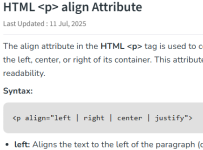
@RonEhrs, this is the second place I've seen this comment from you and you are operating under a misunderstanding. Your example uses "smart quotes" and it's true that you cannot use smart quotes, but some form of (ASCII) quotes are required for proper HTML format. (See fragment of screencap below). These both work fine and are proper HTML:
<p align="center">TEXT</p> // " works fine

This also works with most browsers, but is not proper HTML:
<p align=center>TEXT</p> // no quotes works in most browsers, but is not correct
<p align='center'>TEXT</p> // ' works fine, may not be entirely HTML5 compliant

But "smart quotes" are not interpreted as quotes when rendering HTML and do not work:
<p align=ā€œcenterā€>TEXT</p> // smart quotes DO NOT work

I think you should cease in spreading your misinformation about this. And don't use Word/LO to write HTML.

Source: I'm not allowed to link to other sites, but search for HTML reference align attribute P tag and consult any one of those results. Below is a fragment of the screencap (note the use of quotes).

One other point: In HTML5, the 'align' attribute is deprecated. 'deprecated' means a feature is marked for deletion in a future version. So you'll see HTML5 references telling you to use CSS (with the 'style' attribute):
<p style="text-align:center">TEXT</p> // HTML5 way to do this

But I would still recommend the older format (e.g., <p align="center">TEXT</p>). I don't know when browsers will stop supporting 'align'. It will probably work forever because of all the websites that use it (and if it ever stops working, I'd be surprised if Manu don't change all the existing stories to use the new format). The reason to use the older format is that I'm not sure LE will allow you to use the style attribute and CSS because using that, you could make your story look really different (using 'style' you can use CSS to control almost all aspects of the formatting of our text) and I doubt Laurel will allow that.


1764546836307.png
 
@RonEhrs, this is the second place I've seen this comment from you and you are operating under a misunderstanding. Your example uses "smart quotes" and it's true that you cannot use smart quotes, but some form of (ASCII) quotes are required for proper HTML format. (See fragment of screencap below). These both work fine and are proper HTML:
<p align="center">TEXT</p> // " works fine

This also works with most browsers, but is not proper HTML:
<p align=center>TEXT</p> // no quotes works in most browsers, but is not correct
<p align='center'>TEXT</p> // ' works fine, may not be entirely HTML5 compliant

But "smart quotes" are not interpreted as quotes when rendering HTML and do not work:
<p align=ā€œcenterā€>TEXT</p> // smart quotes DO NOT work

I think you should cease in spreading your misinformation about this. And don't use Word/LO to write HTML.

Source: I'm not allowed to link to other sites, but search for HTML reference align attribute P tag and consult any one of those results. Below is a fragment of the screencap (note the use of quotes).

One other point: In HTML5, the 'align' attribute is deprecated. 'deprecated' means a feature is marked for deletion in a future version. So you'll see HTML5 references telling you to use CSS (with the 'style' attribute):
<p style="text-align:center">TEXT</p> // HTML5 way to do this

But I would still recommend the older format (e.g., <p align="center">TEXT</p>). I don't know when browsers will stop supporting 'align'. It will probably work forever because of all the websites that use it (and if it ever stops working, I'd be surprised if Manu don't change all the existing stories to use the new format). The reason to use the older format is that I'm not sure LE will allow you to use the style attribute and CSS because using that, you could make your story look really different (using 'style' you can use CSS to control almost all aspects of the formatting of our text) and I doubt Laurel will allow that.


View attachment 2580682
You're right about the smart quotes. My bad. Since most formatting is stripped out in the submission box, I assumed that the quotes became stripped too. Now I see they aren't. I stand corrected.
 
Back
Top