Story formatting bug with missing centered copy is browser-dependent.

MrPixel

Just a Regular Guy
Joined
May 12, 2020
Posts
6,433
The previously reported recent problem with missing centered copy is still a problem.

However, it depends on browser. I tested three: Firefox displays correctly. DuckDuckGo and Vivaldi randomly do not display centered text beyond Page 1.

This is beyond annoying. I rely on centered "=====" for scene breaks. Without these, the scenes run together into a word soup. Other authors have mentioned this problem, yet it persists. Take a look at Barstow - What the Future Holds as a recent upload that displays this.

Please fix, and please test with multiple browsers.

Thank you!
 
This is an ongoing issue with both new and historic stories. Centered section breaks render on the first page, but then will often fail to render on the second and subsequent pages unless you manually refresh the page.

@Manu this adversely affects reader experience and is infuriating as a writer. Please! 🙏
 
I can confirm that the bug appears in the Brave browser as well. The same glitch as wanda mentioned above, with the section breaks missing until or unless manually refreshed on any page after the first.
 
I can reproduce this bug on:

Microsoft Edge on windows 10
Firefox 145 on windows 10
Firefox on iOS 18.7.2

interestingly enough, the bug does NOT appear on Firefox 146.0.1 on mac. I tested by upgrading to 146.0.1 on my windows machine and the bug hasn't occurred yet.
 
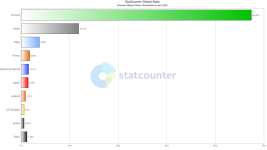
Also, let's please put things in the proper context. I'm happy people use alternative browsers. It shows we think outside of the box. But the reality of what users worldwide use to browse the web is:

1767097803617.png

It's not about how many browsers incorrectly display the text; it's about which ones do and which don't.

I can confirm that Chrome doesn't display the section breaks properly. It only does so after a page reload. And that in itself is a catastrophe.
 
So it appears to be a general bug, not related to Chromium if firefox is also doing it. Edge uses Chromium so if Chrome's doing it I'd expect Edge (and all other Chromium browsers) to do it.

Seems to put it firmly into the CSS / java script (fuck you censor imp) domain, but there are no errors showing in the developer consoles.

(This, incidentally, is why I am also a die-hard believer in server-side rendering of webpage content)
 
My inner SRE is screaming like a chimp on epinephrine, bending cage bars, and desperate to create a status page.
Where would the fun in that be? 😉 It’s far more interactive discovering these little challenges ourselves. I, for one, quite enjoy the smorgasbord of gremlins the site is currently offering.
 
Where would the fun in that be? 😉 It’s far more interactive discovering these little challenges ourselves. I, for one, quite enjoy the smorgasbord of gremlins the site is currently offering.
Yes, but you're a Skandie and we (Western Europe) know you guys are oddly into self-abuse, like beating yourselves with birch branches, going swimming in icy waters, and lutefisk, among other things.

Sensible, British ladies like myself like our gremlins skinned, preserved, and pinned to parchment pages in a book for us to look at and go "oh, yes, I remember this little bugger. Took two barrels and a stabbing to end the sod."

Edit: :D because, so thrrrrpt!
 
Yes, but you're a Skandie and we (Western Europe) know you guys are oddly into self-abuse, like beating yourselves with birch branches, going swimming in icy waters, and lutefisk, among other things.
We may do icy lakes and lutefisk, but you used to swim in the Thames and eat jellied eels. No one here is winning.

It’s been about 1200 years since we last visited you lot. Let’s not repeat that, yes? I’d rather avoid the inevitable complaints when the birch branches come out and we start explaining how things work ;)
 
Also, let's please put things in the proper context. I'm happy people use alternative browsers. It shows we think outside of the box. But the reality of what users worldwide use to browse the web is:

Fuck Chrome. It will never touch any system I own or am responsible for.
 
...manually refresh the page.

Ah. I didn't test that. But I shouldn't have to.

My edu-guess is the styles are being pushed out asynchronously and the body beats them to the punch. I've seen these kind of failures before, and I'll bet that the style controlling text centering is last or near the last of the style block. With @Manu working so hard on site efficiency, I would guess a change to async loading was a go-to in his toolbox.
 
The problem is being caused by the way the story pages are delivered to the browser. The server renders the initial HTML and sends it to the client which builds it into the page that you see on your screen. Part of this process pulls Java Script from the local computer using things called "hydration keys" to attach local JS functions to the data delivered on the page, speeding up delivery and reducing the load on the server.

If you look at the page source, you'll see these used around every paragraph:

<p data-hk=(lots of numbers)>Your story text</p>

This model can go wrong when reading paged content because the hydration keys go out of sync. Reloading the page will reset them and that's when the scene breaks reappear.

They are working fine on most of the content and only cause a problem with the scene break tags. These tags are held in the page as:

<p align="center">=====</p>

Which is a deprecated format in modern web pages. They should be entered as:

<p style="text-align: center;">=====</p>

Changing the alignment format in the HTML might be enough to fix it. Another option would be for the server to force a page reload every time which will reset all the keys in the domain object model and render the page correctly.
 
I might have been the one to kick off this latest round of tantrums with a whiny post I made yesterday. Sorry!

I post stories by submitting a Word doc and not cut 'n' paste into the magic box and I have been facing the problem that others have described above. I don't know if that information helps.

You can see the problem in action here:

https://www.literotica.com/s/the-wicked-garden-ch-01
 
The problem is being caused by the way the story pages are delivered to the browser. The server renders the initial HTML and sends it to the client which builds it into the page that you see on your screen. Part of this process pulls Java Script from the local computer using things called "hydration keys" to attach local JS functions to the data delivered on the page, speeding up delivery and reducing the load on the server.

If you look at the page source, you'll see these used around every paragraph:

<p data-hk=(lots of numbers)>Your story text</p>

This model can go wrong when reading paged content because the hydration keys go out of sync. Reloading the page will reset them and that's when the scene breaks reappear.

They are working fine on most of the content and only cause a problem with the scene break tags. These tags are held in the page as:

<p align="center">=====</p>

Which is a deprecated format in modern web pages. They should be entered as:

<p style="text-align: center;">=====</p>

Changing the alignment format in the HTML might be enough to fix it. Another option would be for the server to force a page reload every time which will reset all the keys in the domain object model and render the page correctly.
This is actually extremely helpful forensics - thanks! It explains a lot about what's going on.

I'm a back-end engineer (shut up @PennyThompson) so java script is just one big mess to me. I don't really see the... value, I guess... of doing things this way when you could simply serve the html from the server and style it with css client-side. I guess if you want swishy-swooshy stuff and some sort of quasi single-page-app thing, sure, but even so, I've always believed that structure comes from HTML, look and feel from CSS, and any additional functionality you need from JS. There's nothing on the Literotica UI that seems to need this level of complexity for the story content section. Sigh.

Unfortunately I'm not sure whether it's possible for us to submit style attributes on embedded html without the site's publication pipelines either stripping them or, worse, flagging them in some way.

It's really frustrating. Everything worked fine until rougly mid-november, and then poof, this mess.
 
This is actually extremely helpful forensics - thanks! It explains a lot about what's going on.

I'm a back-end engineer (shut up @PennyThompson) so java script is just one big mess to me. I don't really see the... value, I guess... of doing things this way when you could simply serve the html from the server and style it with css client-side. I guess if you want swishy-swooshy stuff and some sort of quasi single-page-app thing, sure, but even so, I've always believed that structure comes from HTML, look and feel from CSS, and any additional functionality you need from JS. There's nothing on the Literotica UI that seems to need this level of complexity for the story content section. Sigh.

Unfortunately I'm not sure whether it's possible for us to submit style attributes on embedded html without the site's publication pipelines either stripping them or, worse, flagging them in some way.

It's really frustrating. Everything worked fine until rougly mid-november, and then poof, this mess.
I suppose the priority of any website with high traffic is to reduce the server load, hence the overusage of JS, which typically executes client-side.

But yeah, that post was very helpful. It actually made me check the HTML of my story, and yeah, the align=center is there, even though it became deprecated - I had to check - since HTML 4, which was in the late nineties...

For those who aren't familiar with why that matters... CSS was developed to take care of the presentation of the content, while HTML is supposed to care only about the structure and the content - the data itself. And centering is obviously a way of presenting content.

This kind of intertwining of functions clearly creates a mess of a sort... I saw that Lit (thank god) uses external CSS, and I failed to notice any inline CSS in the body, which was my main suspect for the problem.
I guess it's more complicated than that, but I believe that the poster above is correct in saying that aligning with CSS would likely solve the issue.

Anyway, it was so fun to delve into all of this after... phew, I've no idea how long.
 
Last edited:
Back
Top