
darwin1859
Really Really Experienced
- Joined
- Nov 7, 2017
- Posts
- 427
I would like to see the date that a story was published in the "info box" on the first page. I found a way to do this and I thought I'd share it.
The date is embedded in the source of the page as "date_approve" and I asked AI for a nice bookmarklet (using j-a-v-a-s-c-r-i-p-t) to find this and display it.
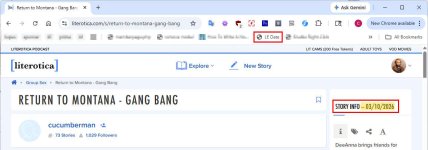
I stored this bookmark on my main bookmark bar, which is visible by default. When I click the bookmark, the date of the story is added to the story info box (I picked to the right of "Story Info" but it could appear elsewhere).
And if you're looking at page 2+ then an "alert" is shown with the date.

But I cannot post j-a-v-a-s-c-r-i-p-t and you should be wary of using code other people post on the Internet. So, instead, I wrote a prompt that you can paste into your favorite LLM. Remove the hyphens from "J-a-v-a-s-c-r-i-p-t" and change your browser name at the end. Here's the prompt I would use:
Obviously, you can revise the prompt to do whatever you want. Below is the code I ended up with [notice it disobeyed me and used the exact CSS class to find the "Story Info" DIV (because I'd given the AI this information earlier in the session) but that's probably too brittle]. I also notice that the double quotes around the value are not optional, and that's probably OK (I think the date is always enclosed as a string).

The date is embedded in the source of the page as "date_approve" and I asked AI for a nice bookmarklet (using j-a-v-a-s-c-r-i-p-t) to find this and display it.
I stored this bookmark on my main bookmark bar, which is visible by default. When I click the bookmark, the date of the story is added to the story info box (I picked to the right of "Story Info" but it could appear elsewhere).
And if you're looking at page 2+ then an "alert" is shown with the date.
But I cannot post j-a-v-a-s-c-r-i-p-t and you should be wary of using code other people post on the Internet. So, instead, I wrote a prompt that you can paste into your favorite LLM. Remove the hyphens from "J-a-v-a-s-c-r-i-p-t" and change your browser name at the end. Here's the prompt I would use:
Code:
Write a J-a-v-a-s-c-r-i-p-t Bookmarklet that searches the page source for the string "date_approve":"mm/dd/yyyy", where quotes and spaces around the key and value are optional. If the date is found, the script should look for any div containing the text "Story Info" and append the date to that div (after "Story Info") preceded by a dash. If no such div is found, display the date in an alert box instead. And if the date itself isn't found at all, alert that it was not found. Include simple step-by-step instructions to create a new bookmark in Chrome.Obviously, you can revise the prompt to do whatever you want. Below is the code I ended up with [notice it disobeyed me and used the exact CSS class to find the "Story Info" DIV (because I'd given the AI this information earlier in the session) but that's probably too brittle]. I also notice that the double quotes around the value are not optional, and that's probably OK (I think the date is always enclosed as a string).
Last edited:


